

Built for property preservation since 2004

Run property preservation from work order to invoice.

UPAMS puts your properties, work orders, field photos, report reviews, client delivery and contractor pay in one system, with an Android app for your crews. Rental portfolios run on it too.

New: UPAMS Mobile for Android · iOS coming soon
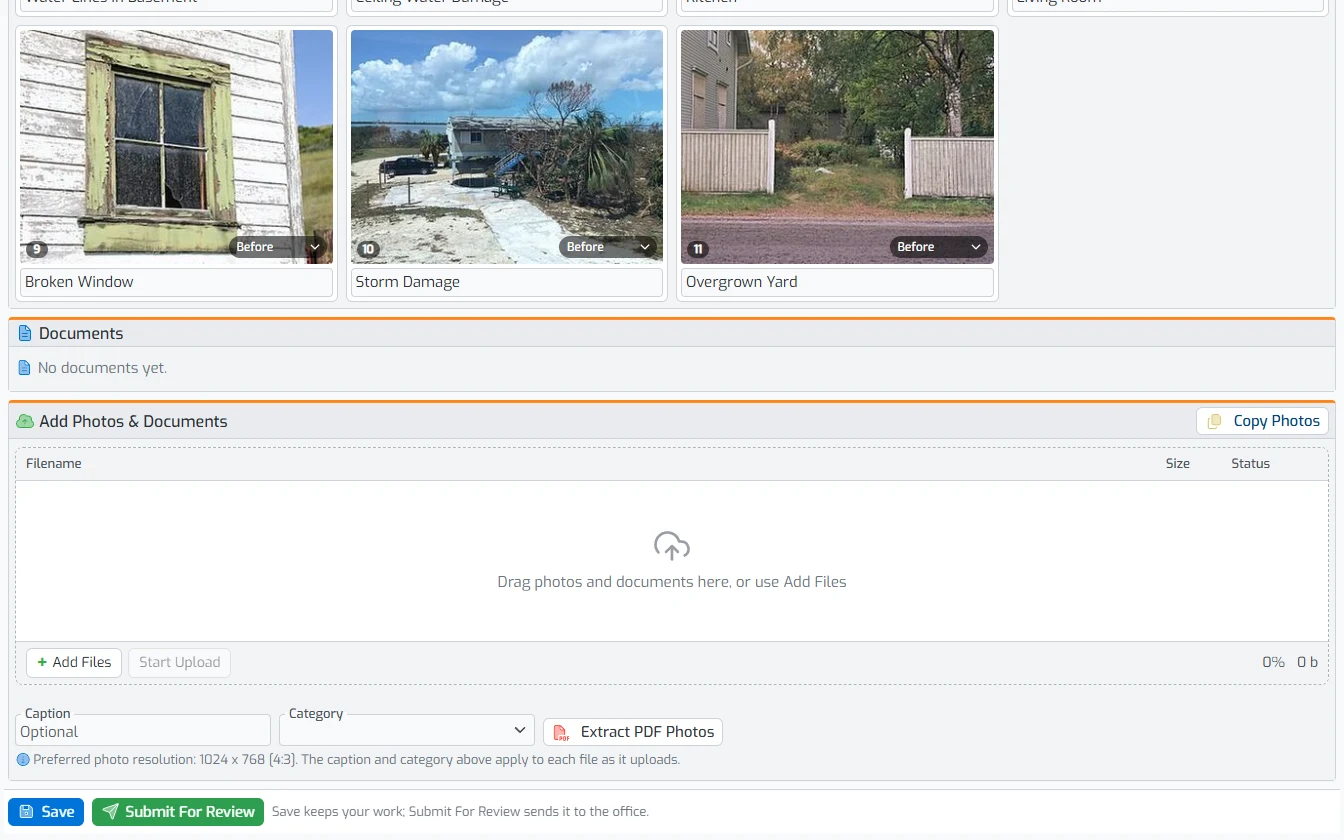
UPAMS report editor with numbered, captioned inspection photos above the photo and document uploader
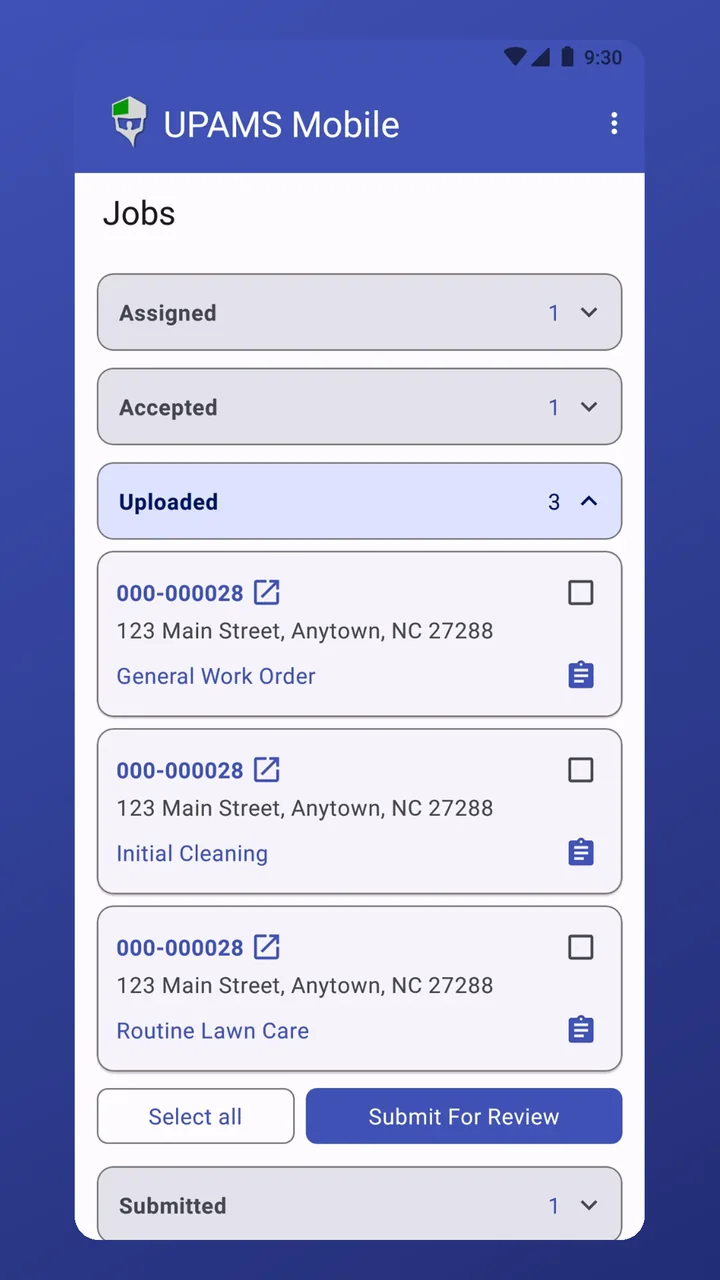
UPAMS Mobile with jobs grouped by status and a Submit For Review button
22+
Years building software for the property field service industry
HUD
Experience servicing HUD contract holders
GSE
Solutions for Fannie Mae & Freddie Mac programs
Support
Business-hours help desk plus an after-hours emergency line

One system for the whole job. Office staff, crews, contractors and clients work in the same records, and each person sees only their part.

Office staff

Add properties and jobs, assign work, review reports, deliver to clients, pay contractors and bill.

Crews & contractors

Accept jobs, upload photos and reports from the app or the web, and get paid for reviewed work.

Supervisors

Hand whole jobs to the people on their crew, follow progress and take work back when plans change.

Clients & tenants

Clients and brokers see their own properties and reports. Tenants see their bills, pay online and request service.

UPAMS for Property Preservation & Field Service

Properties & Inventory

Every property's history in one folder.

  • Import and update properties from Excel, or keep a client's list in sync
  • A Property Folder with the property's jobs, bills, files, records and timeline
  • Local police, fire and landfill contacts found from the property's location
  • Inventory groups and a comparison tool for client lists
  • Open, close, join and merge properties in bulk
  • HOA, utility, subdivision and management company records
  • Map a route through up to 23 properties
  • Optional case numbers, shown first in every address

Work Orders & Assignment

The right job to the right contractor.

  • Add jobs one at a time, in bulk or from an Excel file, or let clients request services
  • Assign by service area and distance, with one-click picks for the closest, previous, primary or exclusive contractor
  • Supervisors hand whole jobs to their crew and take them back
  • Follow every task from Added to Assigned, Accepted, Uploaded, Submitted, Reviewed and Delivered
  • Order a routine service, such as grass cuts, for every property that matches your filters
  • Change dates, pay or contractors in bulk without cancelling the job
  • Automatic reminders for late, unaccepted and unassigned jobs
  • Alerts when a property has duplicate open jobs
  • Worksheets give crews the property's conditions before they go
  • Field requests ask crews for extra work on their next visit

Field Reports & Photos

A report built for every job type.

  • Report forms for each job type, with your own sections and questions
  • Photo policies by client, job task and state list the photos each report needs
  • Photos arrive numbered, captioned, categorized and date-stamped from the app or a drag-and-drop uploader
  • A full-screen photo viewer with arrow keys and swipe
  • Duplicate photos flagged automatically
  • Photos kept upright, with their date, time and GPS location
  • Bulk upload: fill in one package for many jobs and upload it once
  • Field notes and requests travel with the report

Quality Control

Catch problems before your client does.

  • Consistency checks flag missing or low-resolution photos and report errors before review
  • Reviewers rate reports and send them back with a revision request
  • Clean reports can be reviewed automatically
  • Report checks compare answers with the property's conditions
  • A report shows who is editing it, and a manager can take it over
  • Recent front photos of the property shown beside the report for comparison
  • Late submissions can reduce pay automatically, by your rules
  • A photo captioned Front Elevation becomes the property's front elevation when it has none

Delivery to Clients

Reports land where your clients want them.

  • Reports delivered by email, fax or FTP, or straight into your client's system
  • Delivery policies for each client, with automatic retries
  • Clients and brokers log in to see their own properties and reports
  • Hold a delivery until you release it
  • Connections for WorldApp (Form.com) and Equator
  • Report data as well as report files

Contractor Pay & Billing

Pay and bill from the same reviewed work.

  • Pay policies set each contractor's rates, and payments are built from reviewed work in a few clicks
  • Pay changes carry a reason, with approvals and checks for unusual amounts
  • Client invoices from your billing policies
  • Contractor insurance checked before payment
  • Accounting review before payments are final
  • An accounts receivable summary by email

Contractors & Vendors

Know who's qualified before you assign.

  • Profiles track insurance (general liability, workers' comp, auto and E&O), training and documents
  • Checklists block new jobs until a contractor's paperwork is complete
  • Service areas by state, county or zip code and job type: exclusive, primary and extended
  • A coverage report shows who covers an area
  • Alerts before contractor insurance expires
  • Crew job statistics for supervisors

Access & Permissions

Everyone sees only their part.

  • Built-in roles for office staff, reviewers, accounting, supervisors, contractors, clients, owners and tenants
  • Users only see the clients, states and job types in their profile
  • An access log of who opened what
  • Automatic sign-out after inactivity, with a five-minute warning
  • Custom page layouts for each user

See it with your work

The best way to judge UPAMS is with your own clients, job types and reports. Book a walkthrough with our team.

Request a Demo
Product Tour

Take a look inside

Real UPAMS screens with sample data. Pick a screen, or click a screenshot to enlarge it.

Overview Properties Jobs Field Reports Contractors & Accounting

Dashboard

Recent jobs, unpaid bills, job statistics and saved reports as soon as you sign in. Each user can arrange their own page.

Property Folder

Everything about a property on one page: its jobs and their status, bills, files and records, plus nearby police, fire and landfill contacts.

Property Details

Address, access codes and property facts, with a map and the current front elevation photo.

Timeline

Every job added, assigned, reviewed and delivered at a property, with filters for the actions you care about.

Job Reports

Build any job list from filters and columns, save it, export it to Excel or act on every row at once.

Assign Jobs

Open jobs grouped by area, with one-click picks for the closest, previous, primary or exclusive contractor.

Job Task Details

Dates, status, history, attachments and notes for one task, with links to its report, pay, billing and worksheet.

Report Editor

Drop in photos and documents, then caption and categorize them. Drag to reorder, hide or remove; duplicates are flagged for you.

Photo Viewer

Review photos full screen, move with the arrow keys or a swipe, and edit captions and categories in place.

File Folder

Every photo and document for a job, or for the whole property, in one gallery, with the front elevation marked.

Contractor Profile

Contact, company, login, insurance and payment details for each contractor, with their reports and pay policies.

Bills

Rent and other bills with totals for what's billed, paid and late, and a Pay button for each one.

Loans

Owner-financed loans with principal, balance, monthly payment and anything past due at a glance, each with its amortization schedule.

How It Works

From work order to invoice, in one flow

Each step hands off to the next, so nothing waits on an email or a spreadsheet.

  1. Add work

    Import properties and jobs from Excel, add them one at a time, or let clients request services.

  2. Assign

    Pick contractors by service area and distance, or let supervisors hand jobs to their crew.

  3. Work in the field

    Crews accept jobs and upload photos and reports from the app or the web.

  4. Review

    Consistency checks flag problems; reviewers approve the report or ask for a revision.

  5. Deliver

    Reports go to your client by email, fax or FTP, or straight into their system.

  6. Pay & bill

    Contractor payments and client invoices come from the same reviewed work.

Working in the background

  • Reminders for late, unaccepted and unassigned jobs
  • Automatic review of clean reports
  • Delivery retries until reports go through
  • Alerts before contractor insurance expires
  • Alerts for duplicate open jobs at a property
  • Recurring rent bills, late fees and payment reminders
UPAMS for Rental Management

Run your rental portfolio on UPAMS

The same system handles rental properties: rent and bills, online payments, tenant logins, owner-financed loans and the work orders that keep units ready.

Rental plans are priced per unit and sold separately from our preservation plans, so you only pay for the tools your business uses.

Rent & bills

Recurring rent bills are created for you, and late fees are added after the grace period you set.

Online payments

Tenants pay rent by card online. Zelle and Cash App payments are recorded from the bank's email receipts.

Reminders & notices

Bill reminders and late notices go out by email, and by text message where you turn it on.

Tenant logins

Tenants see their bills, pay online and request repairs, which your office turns into work orders in one step.

Owner financing

Track loans with amortization schedules, payments, balances and past-due amounts.

Work orders & inspections

General work orders and inspection reports are included, with vendor tracking and photo review on every repair and turn.

Mobile App

UPAMS Mobile puts every job in your crew's pocket

Crews and contractors accept work, follow the scope, take photos and submit for review right from the property. No laptop required.

  • Accept or decline jobs with the full scope of work and allowed dates.
  • Take or add photos with captions, date and time stamps and GPS tags.
  • Plan the route across selected jobs and open any property in Maps.
  • Upload automatically or on Wi-Fi only, then submit the work for review.
Get it onGoogle Play Coming soon to theApp Store

Scroll for more · click to enlarge

Security & Support

Hosted, monitored and backed up for you

Your properties, photos and reports live on servers we run and maintain, and your team gets a help desk that knows the industry.

Redundant storage

Every photo and document is kept on redundant servers with multiple backups.

Managed servers

Server maintenance, hardware replacement and operating system upgrades are handled for you.

Network monitoring

Constant monitoring for distributed denial of service (DDoS) attacks.

Controlled access

Roles and profiles decide what each person sees, and idle sessions sign out on their own.

Help desk

Support by email, phone and online during business hours.

After-hours line

An emergency hot line for issues outside of business hours.

Guardian Services developers at work
About Us

Built by people who know the field

Since 2004, Guardian Services has built software for companies that look after other people's properties. We design and build UPAMS ourselves, from our office in Eden, North Carolina.

  • Our experience and software come from servicing contract holders for the U.S. Department of Housing and Urban Development.
  • We have built solutions for a broad range of government-backed mortgage programs, including Fannie Mae and Freddie Mac.
  • Our customers' suggestions shape every release, and we keep adding to the platform as their work changes.
Trusted By

Partners & associates

Working together across the property preservation and mortgage servicing industry.

Pricing

Simple pricing that grows with you

No per-user fees: unlimited office staff, field crews and contractors on every plan.

Priced by job tasks with data: inspections, grass cuts, bids and any other task that stores photos, documents or forms. Storage for that data is included. What counts?

Starter

For smaller companies getting organized.

$399/ month

Extra tasks billed the following month

  • 250 job tasks / month
  • $1.60 per extra job task

Includes:

  • Unlimited users
  • Job tracking from assignment through review
  • Late job reminders and field messages
  • Photo policies and missing photo checks
  • Contractor payments from completed work
  • Help desk by email, phone and online
Get Started

Professional

For growing operations with more volume.

$1,750/ month

Extra tasks billed the following month

  • 1,400 job tasks / month
  • $1.25 per extra job task

Everything in Core, plus:

  • Automatic consistency checks on every report
  • Payment approvals, accounting review and pay checks
  • Custom job reports and tailored client reports
  • Report delivery to your clients' systems
  • Available integrations
Get Started

Enterprise

For national operations and custom needs.

From $3,250/ month

Extra tasks billed the following month

  • 3,000+ job tasks / month
  • $1.05 per extra job task

Everything in Professional, plus:

  • Automatic review of lower-risk reports
  • Custom integrations on request
  • Priority support
Contact Sales

Priced per rental unit, with rent billing, work orders and inspection reports included. Units above 500 are billed at a lower rate.

Rentals Essentials

Everything you need to run a rental portfolio.

$1.25/ unit / month

Minimum $149/month · $1.00/unit above 500

Includes:

  • Unlimited users
  • Rent billing, late fees and reminders
  • Online payments and tenant logins
  • General work orders and inspection reports
  • Vendor tracking
  • Photo review on repairs and turns
Get Started
14-day free trial with sample data No per-user fees Pay monthly or annually Free data migration on annual plans Redundant, backed-up storage included

Estimate your monthly cost

Enter your monthly volume and we'll recommend the lowest-cost plan.

Plan type
Recommended
 
    $0/ month

    Request a Demo

    Estimate only. Excludes taxes and optional add-ons.

    FAQ

    Frequently asked questions

    UPAMS, the Unified Property Access and Management System, is Guardian Services' web-based system for property preservation and rental management. It covers properties, work orders, field reports and photos, quality control, delivery to your clients, contractor pay and billing, and comes with the UPAMS Mobile app for field crews.

    It depends on the size of your portfolio and how your current data is organized. Because UPAMS imports properties and jobs from Excel and can keep a client's list in sync, most of the work is mapping your existing records. We'll walk through your setup and give you a timeline during your demo.

    Yes. Properties and jobs can be imported from Excel files, inventory synchronization keeps a client's property list up to date, and bulk tools let you update, open, close or merge many properties at once.

    Crews get their assignments with the scope of work, a worksheet of the property's conditions, field requests and reminders for anything late. They accept the job, upload photos and the report, and submit it for review. Reviewed work feeds their payments. With the UPAMS Mobile app for Android (iOS coming soon), all of this happens from the property.

    Yes. UPAMS runs in any modern web browser on a computer, tablet or phone, and crews can use the UPAMS Mobile app for Android. An iOS app is coming soon.

    Yes. Clients and brokers get their own logins, and their profiles limit them to their own properties and reports. Tenants can log in too, to see their bills, pay online and request service.

    Each client gets a delivery policy. Reports can go out by email, fax or FTP, or straight into the client's own system, and UPAMS retries deliveries that don't go through. You can also hold a delivery until you release it. UPAMS connects with WorldApp (Form.com) and Equator, and we build other connections on request.

    Access is controlled by roles and user profiles, so each person sees only their clients and properties, and idle sessions sign out automatically. Files are kept on redundant servers with multiple backups. Our team handles server maintenance, hardware replacement and operating system upgrades, and the network is monitored for DDoS attacks.

    You won't be cut off. Your plan is billed at the start of each month, and any job tasks over your included amount are billed at your plan's per-task rate ($1.60 on Starter down to $1.05 on Enterprise) with the following month's payment. The pricing calculator shows when a larger plan becomes the cheaper option.

    Storage for the photos, documents and forms on each job task is included in its price, and every file is kept on redundant servers with multiple backups. To keep UPAMS fast for everyone, a few limits apply:

    • Uploads are limited to photos, PDFs and standard office documents. Video and other large media files aren't permitted.
    • Each file has a maximum size, and photos should be uploaded at standard resolution rather than full camera size.
    • Accounts that regularly store far more data per job task than typical fall under the fair-use terms of their service agreement.

    If your uploads run large, we'll help you adjust your photo settings first. Exact limits are listed in your service agreement.

    A job task counts when it holds data: photos, documents, forms or other files stored on our servers. Each task is counted on its own, so a grass cut and an inspection on the same visit are two tasks. Corrections and redone work stay under the original task and aren't counted again, and tasks with nothing stored don't count at all.

    No. Every plan includes unlimited office staff, field crews, contractors and client logins. Preservation plans are priced by your job tasks with data each month, and rental plans by the number of units you manage, so adding people never changes your bill.

    Yes. Rental plans include recurring rent bills with late fees and reminders, online card payments, tenant logins, owner-financed loans with amortization schedules, and general work orders and inspection reports, plus vendor tracking and photo review. Rentals are priced per unit and offered separately from our preservation plans.

    Yes. Every plan comes with a 14-day free trial using sample data, so you can explore UPAMS before moving your own records in. Data migration is free on annual plans.

    Every plan includes help desk support during business hours by email, phone and online, plus an emergency hot line for after-hours issues. Contact support@guardianams.com.
    Contact

    Schedule a demo

    Tell us a little about your operation and we'll set up a walkthrough built around your work.

    Location

    698 S. Linden Drive, Suite 112
    Eden, NC 27288

    Email

    General questions
    contact@guardianams.com

    Technical support
    support@guardianams.com

    We'll only use your details to respond to your request. See our Privacy Policy.